This guide covers everything you need to know about upgrading the RAM and storage on the Samsung Chromebook Galaxy Chromebook (2020). Whether you want faster performance, more memory, or additional storage space, we have the compatibility details and recommended upgrades below.
Samsung Chromebook Galaxy Chromebook — Quick Specs

| Specification | Details |
|---|---|
| Model | Samsung Chromebook Galaxy Chromebook |
| Year | 2020 |
| Type | Chromebook |
| Processor | Intel Core i5-10210U |
| RAM Type | DDR4 |
| RAM Form Factor | Soldered |
| Max RAM | 8GB |
| RAM Slots | Soldered (not upgradeable) |
| Storage Type | M.2 NVMe |
| Storage Slots | 1x M.2 2280 |
Samsung Chromebook Galaxy Chromebook Memory (RAM) Upgrade
The Samsung Chromebook Galaxy Chromebook uses DDR4 memory that is soldered to the motherboard. Unfortunately, this means the RAM cannot be replaced or expanded. Consider this when purchasing.
Samsung Chromebook Galaxy Chromebook Storage (SSD/HDD) Upgrade
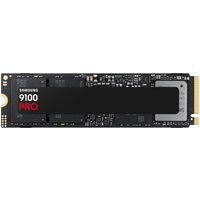
The Samsung Chromebook Galaxy Chromebook supports M.2 NVMe storage with 1x M.2 2280.
Recommended SSD Upgrades
| Recommended SSD | Buy |
|---|---|
| Samsung 970 EVO Plus 1TB NVMe M.2 | Check Price |
| WD Black SN770 1TB NVMe M.2 | Check Price |
| Crucial P3 Plus 500GB NVMe M.2 | Check Price |
Upgrade Difficulty
The Samsung Chromebook Galaxy Chromebook has an upgrade difficulty rating of Limited. Since the RAM is soldered, upgrades are limited to storage only. Always disconnect the battery before performing any internal upgrades.
Upgrade Tips for the Samsung Chromebook Galaxy Chromebook
- Back up all data before replacing or adding storage drives.
- Use an anti-static wrist strap to prevent damage to components.
- Check your current configuration in the BIOS before ordering parts.
- Consider cloning your existing drive to a new SSD for a seamless transition.
Related Guides
Frequently Asked Questions
What is the maximum RAM for the Samsung Chromebook Galaxy Chromebook?
The Samsung Chromebook Galaxy Chromebook supports a maximum of 8GB of DDR4 Soldered memory (soldered, not upgradeable).
What type of SSD does the Samsung Chromebook Galaxy Chromebook use?
The Samsung Chromebook Galaxy Chromebook uses M.2 NVMe storage with 1x M.2 2280.
Can I upgrade the RAM in the Samsung Chromebook Galaxy Chromebook?
No, the RAM in the Samsung Chromebook Galaxy Chromebook is soldered to the motherboard and cannot be upgraded.
Is the Samsung Chromebook Galaxy Chromebook worth upgrading?
Upgrading the SSD in the Samsung Chromebook Galaxy Chromebook can significantly improve performance, especially if you are running out of storage space.