The Dell Precision 3580 is the entry-level Precision workstation, delivering professional-grade performance at a more accessible price point. It’s built for professionals just entering CAD, design, or light content creation work — offering ISV certification (for software like AutoCAD and SolidWorks), user-upgradeable RAM and storage, and NVIDIA professional GPU support. While it has fewer RAM slots than premium models, it’s a solid foundation that can grow with your career, making it an excellent value for budget-conscious professionals.
RAM Compatibility for Dell Precision 3580
The Precision 3580 features dual DDR5 SO-DIMM memory slots, supporting up to 64GB of DDR5 RAM at 4800MHz. This is ample for entry-level to intermediate professional work. Both memory slots are user-accessible, making upgrades straightforward.
| Configuration | Max Capacity | Speed | Module Type | Best For |
|---|---|---|---|---|
| Stock (16GB) | Upgrade to 32GB or 64GB | DDR5-4800MHz | SO-DIMM (Sodimm) | Learning CAD, basic spreadsheets |
| 32GB (2×16GB) | Good mid-range upgrade | DDR5-4800MHz | 2x SO-DIMM modules | Professional CAD, small 3D assemblies, light rendering |
| 64GB (2×32GB) | Maximum capacity | DDR5-4800MHz | 2x SO-DIMM modules | Large assemblies, VFX work, complex simulations |
Upgrade recommendation: Start with the base 16GB and step up to 32GB when your projects demand more memory. For entry-level professionals, 32GB is often the sweet spot — it’s future-proof for CAD and basic animation work without the cost of maxing to 64GB. If you move into heavy rendering or simulation later, 64GB is still affordable as a full upgrade. Buy DDR5 32GB SO-DIMM modules on Amazon UK.
SSD Compatibility for Dell Precision 3580

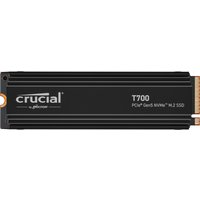
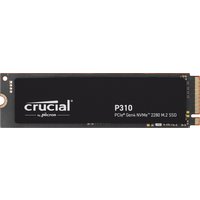
The Precision 3580 includes a single M.2 2280 NVMe SSD slot supporting PCIe Gen 4 speeds (up to 7,400 MB/s). This is sufficient for most professional workloads — boot times and application launches are rapid, and project files load quickly. There’s no secondary slot, so your SSD strategy should prioritise a larger primary drive.
| Slot | Form Factor | Interface | Max Speed | Recommendation |
|---|---|---|---|---|
| Primary (only slot) | M.2 2280 | PCIe Gen 4 NVMe | 7,400 MB/s | Minimum 512GB for OS + apps. Recommend 1TB+ for CAD projects and scratch files. |
Storage strategy: Since there’s only one SSD slot, pick a larger capacity (1TB minimum) rather than upgrading later. Many professionals use external USB-C SSD enclosures for secondary scratch disks if needed — plug into the Thunderbolt 4 port for fast external storage. Shop 1TB+ M.2 NVMe drives on Amazon UK.
Charger Compatibility for Dell Precision 3580
The Precision 3580 uses efficient USB-C Power Delivery charging, with options ranging from 65W to 90W depending on your work intensity. This single-charger approach is convenient for travel — no bulky barrel connectors, just a compact USB-C adapter.
| Charger Type | Power Output | Connector | Best Use |
|---|---|---|---|
| Dell USB-C Charger (standard) | 65W–90W | USB-C | Default charger. Handles full performance under typical CAD workloads. |
| Third-party USB-C PD charger | 65W–90W | USB-C | Works reliably. Any USB-C PD 65W+ will work. Multiport chargers are useful for travel. |
| Power bank with USB-C PD | 30W–100W | USB-C | Travel option for light work. 65W+ recommended for sustained use. |
The 3580’s USB-C PD approach is one of its advantages — you’re not locked into a proprietary barrel connector. Any quality 90W USB-C charger from reputable brands will work. This flexibility is especially valuable for travel and hot-desking scenarios. Find compatible USB-C chargers on Amazon UK.
Dock Compatibility for Dell Precision 3580
The Precision 3580 includes Thunderbolt 4, enabling compatibility with Thunderbolt 4 docks and USB-C hubs. For a budget-oriented workstation, even a simple USB-C hub can extend your connectivity — though a proper TB4 dock provides better stability for a permanent desk setup.
| Dock Type | Typical Ports | Power Passthrough | Recommendation |
|---|---|---|---|
| TB4 dock (e.g. Dell WD22) | Dual DisplayPort, USB-A, USB-C, audio, RJ45 | 100W–240W | Best for desk work. Native drivers with Precision machines. Worth the investment. |
| Budget TB4 dock | Usually 4–6 ports (USB-A, USB-C, DisplayPort) | 60W–100W | Works well. Verify at least 65W power passthrough to avoid throttling during use. |
| USB-C hub (basic) | 2–4 USB-A, SD reader | Usually <60W | Budget option for travel. Sufficient for light desk use but no DisplayPort support typically. |
For a permanent desk setup, a Thunderbolt 4 dock is strongly recommended — it provides multi-monitor support and cleaner cable management. Budget-conscious options exist that still offer good value.
Dell Precision 3580 Full Specifications
| Component | Specification |
|---|---|
| Processor | 13th Gen Intel Core i5 or i7 (mobile processors) |
| RAM | 2× DDR5 SO-DIMM, up to 64GB (32GB modules at 4800MHz) |
| Storage | 1× M.2 2280 NVMe PCIe Gen 4 (7,400 MB/s) |
| Display | 15.6-inch FHD (1920×1200) standard, optional 4K upgrade |
| GPU | NVIDIA RTX A500 (4GB GDDR6) — ISV-certified |
| Connectivity | Thunderbolt 4, USB 3.2, audio jack, SD card reader |
| Charging | USB-C Power Delivery (65W–90W) |
| Weight | Approximately 1.84 kg (lightweight for a workstation) |
| Warranty | 1-year standard, upgradeable to 3-year ProSupport or on-site |
Frequently Asked Questions — Dell Precision 3580
Is the Precision 3580 suitable for professional CAD work?
Yes. The 3580 is ISV-certified, meaning AutoCAD, SolidWorks, and other professional software have been formally tested on it. It’s designed as an entry-level professional machine. It handles most CAD projects smoothly — only extremely large assemblies (50,000+ parts) might benefit from the larger Precision models.
Can I upgrade RAM and SSD myself?
Yes. Both the RAM slots and SSD are user-accessible. No special tools required. You can swap memory and the single SSD with basic hardware skills.
Why only one SSD slot instead of two?
It’s a cost trade-off for the entry-level positioning. For most CAD and design workflows, a single fast SSD is sufficient. If you need a dedicated scratch disk later, external USB-C SSD enclosures offer a cost-effective workaround.
Is the RTX A500 GPU sufficient for professional work?
Yes. The RTX A500 is ISV-certified and handles CAD visualisation, light rendering, and VFX smoothly. For GPU-accelerated rendering (Octane, V-Ray), it’s entry-level — you’d want an RTX 2000 or higher for professional rendering farms.
Can I use any USB-C charger?
Yes — any USB-C Power Delivery charger rated 65W or higher will work with the 3580. This is one of its best advantages over older models with proprietary chargers. Multiport USB-C chargers are perfect for travel.
Is the 3580 good value compared to commercial laptops?
Absolutely. You’re paying for ISV certification, professional GPU drivers, and workstation-grade build quality — things a consumer laptop won’t offer. For CAD professionals, the 3580 is one of the best-value entry points into professional computing.
Recommended Products
These are the products we recommend based on this guide. All links go to Amazon UK where you can check current prices and availability.
| Product | Why We Recommend It | Amazon UK |
|---|---|---|
| Corsair Vengeance DDR5 SO-DIMM 32GB (2×16GB) 5600MHz | Top-rated DDR5 kit for gaming & productivity | View on Amazon UK |
| Kingston Fury Impact DDR5 SO-DIMM 32GB (2×16GB) 5600MHz | Excellent DDR5 alternative with XMP support | View on Amazon UK |
| Crucial DDR5 SO-DIMM 16GB 5600MHz | Affordable single-stick DDR5 | View on Amazon UK |
| G.Skill Ripjaws DDR5 SO-DIMM 32GB 5600MHz | High performance DDR5 for enthusiasts | View on Amazon UK |
| Samsung 990 Pro 2TB NVMe M.2 2280 | Fastest consumer NVMe — ideal for gaming & editing | View on Amazon UK |
| WD Black SN850X 2TB NVMe | Excellent Gen4 speed with heatsink option | View on Amazon UK |
| Crucial P5 Plus 1TB NVMe | Great value Gen4 SSD | View on Amazon UK |
| Kingston NV2 1TB NVMe | Budget-friendly with solid reliability | View on Amazon UK |
Prices and availability may vary. As an Amazon Associate, we earn from qualifying purchases.
Related Dell Upgrade Guides
- Dell Battery Replacement: Latitude, XPS & Inspiron Step-by-Step
- Best RAM for Dell Laptops in 2026
- Dell Precision T7920 RAM & SSD Upgrade Guide (2018)
- Dell Precision T7875 RAM & SSD Upgrade Guide (2024)
- Dell Precision T5860 RAM & SSD Upgrade Guide (2024)
- Dell Upgrade Guide
Not sure what fits? Use our free Compatibility Checker covering 3,195+ models.