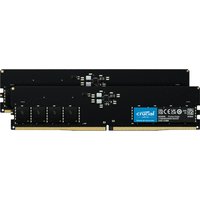
RAM speed vs CAS latency is one of the most confusing aspects of memory specifications. You’ll see RAM marketed as “DDR5-7200 CL36” or “DDR4-3600 CL16” and wonder: which number matters more? Should you buy faster RAM with high latency, or slower RAM with low latency? In reality, both matter, but their importance depends on your use case and processor. This guide cuts through the marketing confusion and explains what these numbers actually mean, how to calculate true latency, and which combinations deliver the best performance for gaming, productivity, and content creation.
RAM specifications have become more complex over time. A decade ago, the choice was simple: faster MHz was always better. Modern RAM is more nuanced. Your processor architecture, workload type, and whether you’re overclocking (XMP/EXPO) all affect how much RAM speed and latency matter. Understanding these specifications helps you make an informed purchase and avoid overpaying for performance gains you won’t actually notice.
Understanding RAM Specifications: MHz, MT/s, and Bandwidth

What MHz Means
RAM speed is measured in Megahertz (MHz), which represents how many million cycles per second the memory can perform. When you see “DDR5-6400,” that 6400 is the speed in MHz.
However, here’s the confusing part: RAM is Double Data Rate (DDR), which means it can transfer data twice per clock cycle. So DDR5-6400 actually has a clock speed of 3200MHz, not 6400MHz. The “6400” refers to the effective data rate (MT/s, or Megatransfers per second), which is double the clock speed.
This is why comparing RAM speeds to processor speeds is misleading. Your CPU might run at 5.8GHz, but your RAM at “6400 MHz” is actually running at 3200MHz. RAM is inherently much slower than your CPU, which is why it’s called “memory” rather than “processing.”
Bandwidth Calculation
To calculate actual bandwidth (how much data per second flows from RAM to your CPU):
Bandwidth = Speed (MT/s) × Bus Width (bytes) × Number of Channels
For a typical dual-channel system:
- DDR4-3600: 3600 MT/s × 8 bytes × 2 channels = 57.6 GB/s
- DDR5-6400: 6400 MT/s × 8 bytes × 2 channels = 102.4 GB/s
DDR5-6400 offers nearly 2x the bandwidth of DDR4-3600. This is why DDR5 feels snappier — it can feed your CPU data much faster.
Understanding CAS Latency (CL)
What CAS Latency Is
CAS latency (CL) is the number of clock cycles it takes for RAM to respond to a read request from your CPU. Lower CAS latency means the RAM responds faster to requests.
When you see “DDR4-3600 CL16,” the CL16 means the RAM takes 16 clock cycles to respond. “DDR5-6400 CL36” means 36 cycles.
Wait — that sounds like DDR5 is much slower! But that’s because DDR5 and DDR4 have different clock speeds. To compare fairly, we need to convert this to actual time (nanoseconds), not clock cycles.
Calculating True Latency in Nanoseconds
This is the key insight that most people miss. To compare latency between different RAM types fairly:
True Latency (ns) = (CAS Latency / Speed in MHz) × 1000
Let’s compare three common RAM configurations:
| RAM Type | Speed (MHz) | CAS Latency | True Latency (ns) | Notes |
|---|---|---|---|---|
| DDR4-3600 | 3600 | CL16 | 4.44 ns | Standard mid-range DDR4 |
| DDR4-3600 | 3600 | CL18 | 5.00 ns | Looser timing, slightly cheaper |
| DDR5-6400 | 6400 | CL36 | 5.63 ns | Standard DDR5 (surprisingly higher latency than DDR4!) |
| DDR5-6400 | 6400 | CL30 | 4.69 ns | Tight DDR5 timing (expensive, marginal gains) |
| DDR5-7200 | 7200 | CL36 | 5.00 ns | Fast DDR5, better latency than standard |
This is crucial: even though DDR5-6400 CL36 has a higher CAS latency (36 vs 16), its true latency in nanoseconds is actually close to DDR4-3600 CL16 because DDR5 runs twice as fast. The absolute time is what matters to your CPU, not the cycle count.
The surprising conclusion: DDR5’s higher bandwidth compensates for its slightly higher latency. Most users will see better overall performance from DDR5-6400 than DDR4-3600, even though the CL numbers look worse.
Which Matters More: Speed or Latency?
For Gaming
Bandwidth (speed) matters more than latency. Modern games are bandwidth-hungry — they need RAM to constantly feed texture data, model data, and audio to the GPU. A faster RAM speed improves frame rates more noticeably than lower latency.
In testing, upgrading from DDR4-3200 to DDR4-3600 typically improves gaming FPS by 3-7%. Going from DDR4-3600 to DDR5-6400 improves FPS by 5-12%, depending on the game and GPU. The latency difference between CL16 and CL36 is almost imperceptible in gaming.
Rule of thumb: Buy the fastest RAM your motherboard and budget support. Latency is secondary.
For Productivity and Office Work
Latency matters slightly more, but the difference is tiny. Spreadsheets, Word documents, and web browsing don’t stress RAM bandwidth. The latency difference between CL16 and CL36 is about 1 nanosecond — imperceptible to humans.
In productivity workloads, the total amount of RAM (8GB vs 16GB vs 32GB) matters far more than whether it’s CL16 or CL36. You’ll never notice the latency difference.
For Video Editing and 3D Rendering
Speed (bandwidth) matters more. Video editing requires moving massive amounts of data (video frames) between storage, RAM, and the GPU. Higher bandwidth RAM helps. Latency is less important — you’re not making millions of tiny requests; you’re making fewer but larger data transfers.
If you’re doing 4K or 8K video editing, DDR5 is noticeably faster than DDR4, primarily because of its superior bandwidth.
DDR4 vs DDR5 Latency and Speed Trade-offs
This comparison shows why DDR5 adoption has been slower than expected:
| Aspect | DDR4 | DDR5 |
|---|---|---|
| Typical base speed | 3200 MHz | 4800 MHz |
| Maximum speed (consumer) | ~4000 MHz (OC) | ~7200 MHz (EXPO/XMP) |
| Typical CAS latency | CL16-18 | CL30-40 |
| True latency (typical) | 4.4-5.6 ns | 5.0-6.3 ns |
| Bandwidth advantage | Baseline | ~80% higher |
| Cost per GB | Cheaper | More expensive |
| Motherboard cost | Much cheaper | More expensive (newer platforms) |
For this reason, DDR4 remains popular for budget builds even in 2026. A DDR4-3600 CL16 system might be 10-15% slower in bandwidth than DDR5-6400, but costs 20-30% less. For productivity users, the choice is easy: stick with DDR4 to save money.
XMP/EXPO Profiles: Automatic Overclocking
What XMP and EXPO Are
XMP (eXtreme Memory Profile) is Intel’s technology for automatic RAM overclocking. EXPO (Extended Profiles for Overclocking) is AMD’s equivalent. Both allow RAM to automatically run at faster speeds and tighter timings than the JEDEC standard.
Most consumer RAM ships in JEDEC mode by default (much slower than advertised). You must enable XMP/EXPO in the BIOS to achieve the speeds on the box. This is why a kit marked “DDR4-3600” might run at only 3200MHz out of the box until you enable XMP.
Stability and Compatibility
Modern XMP/EXPO profiles are rock-solid. They’re tested at the factory and are generally safe to enable. However, some edge cases exist:
- Very cheap motherboards sometimes have poor XMP support — profiles might not apply correctly or cause instability.
- Mixing different RAM brands or very old RAM with new systems occasionally causes issues.
- Very aggressive XMP profiles (like DDR5-7200 CL30) might be unstable on some boards — testing is recommended.
If you enable XMP and experience crashes or instability, simply disable it and return to JEDEC speeds. No harm done. In 99% of cases, XMP works perfectly.
Should You Enable It?
Yes, always. The performance gain varies by workload (3-15% in gaming, 2-8% in productivity), but there’s zero downside if the profile is stable. Enable XMP/EXPO in BIOS and forget about it.
How Much Do Latency Differences Actually Matter?
Let’s put real numbers on this. The difference between CL16 and CL36 is approximately 1 nanosecond of true latency. Your CPU executes billions of instructions per second. This 1 nanosecond difference is invisible in daily use.
In synthetic benchmarks, you might see a 1-3% difference between tight and loose timings. In real-world gaming, productivity, or content creation, you won’t notice it. The latency difference between DDR4-3600 CL16 and DDR5-6400 CL36 is similarly tiny in absolute terms, even though DDR5’s bandwidth advantage is substantial.
Don’t optimize for latency in isolation. It’s like worrying about the 0.1% performance difference between two GPU models when the GPU is only 40% of your frame rate bottleneck. Bandwidth, total capacity, and price are far more important.
Choosing RAM: Speed vs Latency vs Price
For Gaming
Priority: Speed > Latency > Price
Buy the fastest RAM your budget and motherboard support. Don’t compromise speed for lower latency. For Intel 13th/14th gen and AMD Ryzen 7000/9000:
- Budget option: DDR5-5600 (saves money, still faster than DDR4)
- Sweet spot: DDR5-6400 (excellent price-to-performance)
- Overkill: DDR5-7200 (diminishing returns; only if budget allows and you’re chasing max FPS)
CAS latency is less important. DDR5-6400 CL36 performs better overall than DDR5-5600 CL30.
For Productivity
Priority: Total Capacity > Price > Speed > Latency
16GB is the minimum in 2026. 32GB is recommended for multitasking. Speed and latency barely matter. Buy whatever is cheapest at your desired capacity:
- DDR4-3600 is still excellent and saves money.
- If upgrading an old system, DDR4-3200 is fine.
- DDR5 only if you’re building a new system anyway (for future-proofing).
For Content Creation (Video, 3D)
Priority: Total Capacity > Speed > Latency > Price
Get as much RAM as your motherboard supports (typically 32GB, ideally 64GB for 4K+ workflows). Speed matters more than latency. Opt for:
- 32GB DDR5-6400 minimum.
- If your timeline scratches on playback, upgrade to DDR5-7200 and check if your drives are the bottleneck.
- Latency is secondary — don’t pay extra for tight timings.
Budget Build
Priority: Price > Capacity > Speed > Latency
Buy 16GB of whatever is cheapest at acceptable speed:
- DDR4-3200 is fine.
- DDR5-5600 if prices are competitive with DDR4.
- Don’t overpay for higher latency specs you won’t notice.
Real Performance Impacts: Measurable vs Imperceptible
| Upgrade Scenario | Performance Impact | Perceptible? |
|---|---|---|
| DDR4-2133 → DDR4-3600 | 10-20% faster in gaming, 5-10% in productivity | Yes, very noticeable |
| DDR4-3200 → DDR4-3600 | 3-5% faster in gaming, negligible in productivity | Barely noticeable |
| DDR4-3600 → DDR5-6400 | 5-15% faster in gaming, 5-10% in content creation, negligible in productivity | Noticeable in gaming, imperceptible in office work |
| CL36 → CL30 (same speed, same generation) | 1-3% in synthetic benchmarks, <1% in real applications | Not perceptible |
| 8GB → 16GB | Eliminates stutters from memory exhaustion, dramatically better multitasking | Extremely noticeable |
The takeaway: upgrading speed between RAM generations matters. Upgrading latency within the same generation is pointless.
Recommended Products
DDR5 RAM (Best for Gaming and Future-Proofing)
| Product | Speed/Latency | Notes | Link |
|---|---|---|---|
| Corsair Vengeance DDR5 32GB Kit (2x16GB) | DDR5-6400 CL36 | Excellent gaming RAM, standard speed, great price-to-performance | View on Amazon UK → |
| Kingston Fury Beast DDR5 32GB Kit | DDR5-6400 CL32 | Excellent performer, tighter timings, RGB lighting | View on Amazon UK → |
| Crucial DDR5 32GB Kit | DDR5-5600 CL28 | Budget-friendly DDR5, still very fast, excellent value | View on Amazon UK → |
DDR4 RAM (Budget-Friendly, Still Excellent)
| Product | Speed/Latency | Notes | Link |
|---|---|---|---|
| Corsair Vengeance DDR4 32GB Kit | DDR4-3600 CL18 | Proven performer, great for gaming, excellent value | View on Amazon UK → |
| G.Skill Flare X DDR4 32GB Kit | DDR4-3600 CL18 | AMD-optimised, excellent stability, great reviews | View on Amazon UK → |
| Kingston Fury Beast DDR4 32GB Kit | DDR4-3600 CL16 | Tight timings, excellent gaming performance, very reliable | View on Amazon UK → |
Prices and availability may vary. As an Amazon Associate, we earn from qualifying purchases.
Related Guides
- DDR4 vs DDR5: Which RAM Should You Buy?
- Laptop RAM Compatibility Guide
- 8GB vs 16GB vs 32GB RAM: How Much Do You Need?
- How to Enable XMP/EXPO in Your BIOS
- Dual-Channel Memory Explained
Try Our Free Compatibility Checker
Not sure what RAM your laptop supports? Use our free Laptop Upgrade Compatibility Checker to find compatible RAM, SSD, and other upgrades for your specific model.
Frequently Asked Questions
Does RAM speed matter for gaming?
Yes, it matters more than latency. Upgrading from DDR4-3200 to DDR4-3600 improves gaming FPS by 3-7%. Upgrading from DDR4-3600 to DDR5-6400 improves FPS by 5-12%, depending on the game and GPU. The difference between CL16 and CL36 is nearly imperceptible in gaming.
What’s true latency and why does it matter?
True latency is measured in nanoseconds and is calculated as (CAS Latency / Speed in MHz) × 1000. This lets you compare RAM from different generations fairly. DDR5-6400 CL36 has higher true latency than DDR4-3600 CL16 (5.63 ns vs 4.44 ns), but the difference is tiny and more than offset by DDR5’s bandwidth advantage.
Should I prioritise speed or latency?
Prioritise speed (bandwidth). For gaming, buy the fastest RAM your budget allows. Latency is a secondary concern. The difference between CL16 and CL36 is about 1 nanosecond — imperceptible in real use.
Is DDR5-6400 really faster than DDR4-3600?
Yes. Despite slightly higher true latency, DDR5-6400’s nearly 2x bandwidth advantage makes it faster in most workloads. In gaming, expect 5-12% faster FPS. In productivity, the difference is negligible.
What’s the difference between XMP and EXPO?
XMP is Intel’s automatic overclocking technology; EXPO is AMD’s equivalent. Both allow RAM to run faster than default JEDEC speeds. Enable whichever applies to your motherboard (usually in BIOS). Both are stable and highly recommended.
Do I need to enable XMP/EXPO?
Yes. RAM marketed at high speeds (e.g., “DDR4-3600”) runs slower by default until you enable XMP/EXPO. Enabling it is completely safe and provides 3-15% performance improvements depending on your workload. Always enable it.
Is DDR4 still worth buying in 2026?
Yes, for productivity and budget builds. DDR4-3600 is still fast enough and significantly cheaper than DDR5. If you’re building a new gaming system, DDR5 is worth the investment. If you’re upgrading an older system for productivity, DDR4 saves money without real-world performance loss.