Mac Mini 2018 Intel i3 — Quick Specs Summary

| Component | Specification | Upgradeable? |
|---|---|---|
| Processor | Intel Core i3-8100B (4-core, 3.6–4.0 GHz, Intel UHD 630) | No |
| RAM | 8GB DDR4 SO-DIMM (2 slots, max 64GB) | Yes — UPGRADEABLE to 32GB/64GB |
| Internal SSD | 128GB M.2 NVMe | Likely soldered; check with seller |
| Ports | 4× USB-A 5Gbps, HDMI 2.0, 2× Thunderbolt 3, Gigabit Ethernet | No |
| Wireless | WiFi 5 (802.11ac), Bluetooth 5.0 | No |
| Power Supply | 90W external PSU | No |
| Display Outputs | HDMI 2.0 + 2× TB3 (4K 60Hz max) | N/A |
| Price (used) | £150–250 (8GB/128GB) | N/A |
The Budget Mac Mini: Entry-Level Upgradeability
Processor Limitations
The i3-8100B is a 4-core / 4-thread chip at 3.6–4.0 GHz. Performance ceiling: ~30–40% slower than i5 in multi-threaded workloads, ~10% slower in single-threaded. Suitable for:
- Office work (email, document editing, spreadsheets)
- Web browsing and media consumption
- Light development (single IDE, interpreted languages)
- Media server roles (Plex, NAS)
Not suitable for: Video editing, 3D work, or heavy Docker fleets without significant patience.
Second-Hand Value
Used 2018 i3 Mac Minis are the cheapest way to get into Apple Silicon upgrade-capable hardware: £150–200 for base 8GB/128GB. If you can tolerate slower performance and upgrade RAM yourself, this is an excellent entry point.
RAM Compatibility & Upgrades
Same SO-DIMM Architecture
Like i5 and i7, the i3 has 2× user-replaceable DDR4 SO-DIMM slots. This is the main appeal of budget 2018 models—no soldered RAM.
Upgrade Path
- Factory config: 8GB (2× 4GB)
- First upgrade: 8GB → 16GB (2× 8GB SO-DIMM, £40–60)
- Full upgrade: 8GB → 32GB (2× 16GB SO-DIMM, £80–120)
- Theoretical maximum: 64GB (2× 32GB), but modules not yet practical
Installation Steps
- Back up your Mac
- Power down, unplug for 30+ seconds
- Remove bottom panel (8× pentalobe screws)
- Locate 2 adjacent RAM slots under logic board
- Push clip tabs outward to eject current modules (45° angle)
- Insert new DDR4 SO-DIMM at 45°, press firmly until clicks
- Reassemble bottom panel, boot up
- Verify in System Report → Memory
RAM Recommendations
For i3 Mac Mini, upgrade strategy depends on use case:
| Use Case | Recommended Upgrade | Cost |
|---|---|---|
| Office / web browsing | 8GB → 16GB (2× 8GB) | £40–60 |
| Light development + Docker | 8GB → 32GB (2× 16GB) | £80–120 |
| Media server (Plex, NAS) | 8GB → 16GB (minimum) | £40–60 |
RAM Brands
Use standard DDR4 SO-DIMM from Crucial, Kingston Fury, G.Skill, or Corsair. Ensure:
- DDR4 (not DDR5)
- SO-DIMM form factor (laptop-style, not full DIMM)
- CAS Latency 22
- 1.2V nominal voltage
Popular upgrade options:
- Crucial DDR4 SO-DIMM 16GB — reliable, fast shipping
- Kingston Fury Impact DDR4 — performance-oriented
- G.Skill DDR4 SO-DIMM — excellent value
Storage & SSD
128GB Base Model: Soldered Storage
Unlike i5/i7 models, the 2018 i3 always comes with 128GB SSD—and this storage is almost certainly soldered to the logic board. Replacement is not user-friendly without micro-soldering.
Storage Management Strategy
With only 128GB internal, you’ll need:
- Aggressive OS/app cleanup (target ~20GB free)
- External Thunderbolt 3 SSD for project files (Samsung T7, OWC Mercury, £100–150 for 500GB)
- Regular cleanup/archival of old downloads
Workaround: External SSD Setup
Practical workflow:
- Keep internal 128GB for OS + essential apps (~60GB used)
- Connect external TB3 SSD (500GB–1TB) for media, projects, development
- Use external SSD as primary working storage
Recommended external storage:
- Samsung T7 500GB — fast Thunderbolt 3 SSD, excellent build quality
- SanDisk Extreme Pro SSD — portable, durable for travel
- Thunderbolt 3 SSD Enclosure — pair with NVMe drive for custom capacity
Total cost: i3 Mac Mini (£150–200) + external 500GB SSD (£100–120) = £250–320 for fully functional system.
Power & Thermal Considerations
90W External PSU
Same 90W USB-C adapter as i5/i7. Replacement cost: £40–80 if it fails.
Cooling Performance
The i3’s 4 cores run cool compared to i5/i7. Even with 32GB RAM upgrade, thermal performance remains excellent. Passive cooling handles sustained workloads up to 25°C ambient temperature.
Ports & Display Support
Thunderbolt 3 Connectivity
2× TB3 ports (same as i5/i7). Enables external RAID arrays, capture cards, high-speed SSDs. TB3 docks are less common now; TB4 docks can work at TB3 speeds (40 Gbps).
TB3 dock options for Mac Mini i3:
- CalDigit TS4 — TB4-compatible (works at TB3 speeds), 6 ports, excellent reviews
- USB-C Hub — affordable multi-port expansion
Display Outputs
HDMI 2.0 (4K 60Hz) + TB3 (up to 5K). Multi-display setups require TB3 adapters or docks.
WiFi 5 & Bluetooth
WiFi 5 Performance
802.11ac delivers 250–350 Mbps in typical offices. For fast file transfers, use Gigabit Ethernet (included) or external TB3 SSD.
Bluetooth 5.0
Full compatibility with modern Bluetooth peripherals.
Upgradeability Score
| Category | Score | Notes |
|---|---|---|
| RAM Upgrade | 9/10 | User-replaceable SO-DIMM; full 32GB upgrade path |
| SSD Upgrade | 2/10 | 128GB storage likely soldered; external SSD mandatory |
| Ports & Connectivity | 6/10 | 2× TB3 sufficient for external RAID/SSD expansion |
| Display Support | 6/10 | HDMI + TB3; acceptable but older standards |
| Overall Upgradeability | 6/10 | Excellent RAM upgradeability; storage requires external expansion (not ideal) |
Frequently Asked Questions
Is the 2018 i3 worth buying as of 2024?
Yes, if price is under £200 and you upgrade RAM to 16GB. Suitable for office work, light development, media servers, and hobbyists. Avoid if doing video/3D or expecting cutting-edge performance.
Can I upgrade i3 RAM to 32GB?
Yes. Buy 2× 16GB DDR4 SO-DIMM (£80–120), follow the installation steps. Performance gains will be incremental due to i3’s 4 cores, but helpful for background services and multitasking.
What should I do about the 128GB storage?
Add external Thunderbolt 3 SSD (500GB–1TB, £100–150). Make it your primary working drive for projects, media, and development. Keep internal storage lean: OS + essential apps only.
Is i3-8100B good for development?
Yes, for single-IDE work (Python, JavaScript, Go). Docker fleets are slower (4 cores); best paired with 32GB RAM. Not ideal for C++ heavy compilation.
How long until the i3 becomes obsolete?
Slow but usable for 3–4 more years (through 2027–2028). macOS support ends ~2025–2026. By then, older Apple Silicon (M1/M2) will be cheaper and faster.
Recommended Products
These are the products we recommend based on this guide. All links go to Amazon UK where you can check current prices and availability.
| Product | Why We Recommend It | Amazon UK |
|---|---|---|
| Corsair Vengeance DDR4 SO-DIMM 32GB (2×16GB) 3200MHz | Best overall DDR4 upgrade kit | View on Amazon UK |
| Kingston Fury Impact DDR4 SO-DIMM 32GB (2×16GB) 3200MHz | Reliable alternative with tight latency | View on Amazon UK |
| Corsair Vengeance DDR5 SO-DIMM 32GB (2×16GB) 5600MHz | Top-rated DDR5 kit for gaming & productivity | View on Amazon UK |
| Kingston Fury Impact DDR5 SO-DIMM 32GB (2×16GB) 5600MHz | Excellent DDR5 alternative with XMP support | View on Amazon UK |
| Samsung 990 Pro 2TB NVMe M.2 2280 | Fastest consumer NVMe — ideal for gaming & editing | View on Amazon UK |
| WD Black SN850X 2TB NVMe | Excellent Gen4 speed with heatsink option | View on Amazon UK |
| Crucial P5 Plus 1TB NVMe | Great value Gen4 SSD | View on Amazon UK |
| Kingston NV2 1TB NVMe | Budget-friendly with solid reliability | View on Amazon UK |
Prices and availability may vary. As an Amazon Associate, we earn from qualifying purchases.
Related Apple Upgrade Guides
- Which MacBooks Have Soldered SSD & RAM? Complete List (2012-2026)
- Can You Upgrade a MacBook? RAM, SSD & Storage Options by Model
- MacBook External Monitor Compatibility
- Apple MacBook Pro 15″ (2013)
- Apple Mac mini (2014)
- Apple Upgrade Guide
Not sure what fits? Use our free Compatibility Checker covering 3,195+ models.
Helpful Guides
Recommended 64GB RAM Upgrades
Patriot Memory
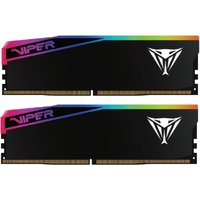
Patriot Memory Viper Elite 5 Ultra memory module 64 GB 2 x 32 GB DDR5
£1,627.99
View Deal