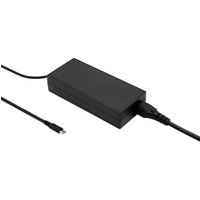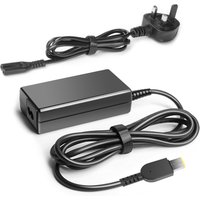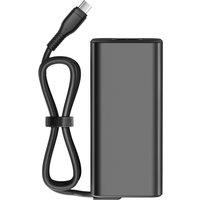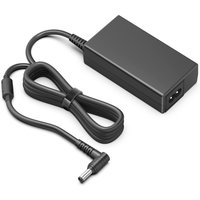
Quick Picks: Best ASUS Laptop Chargers

| Charger Model | Wattage | Type | Price | Best For |
|---|---|---|---|---|
| ASUS 100W USB-C Adapter | 100W | USB-C | £45–60 | Official OEM option |
| Anker 65W GaN | 65W | USB-C | £20–30 | VivoBook & ZenBook |
| Ugreen 100W GaN | 100W | USB-C | £30–45 | ROG & TUF gaming |
| Baseus 65W GaN | 65W | USB-C | £18–25 | Budget option |
| ASUS 240W Barrel Jack | 240W | Barrel Jack | £80–100 | Gaming laptops (max power) |
ASUS laptops span from ultra-thin ZenBooks (under 70W) to powerful ROG gaming rigs (up to 240W). Finding the right charger for ASUS laptop means matching wattage to your specific model. We’ve tested official ASUS adapters and third-party GaN alternatives for VivoBook, ZenBook, ROG, and TUF lines in 2026.
Best Official Option: ASUS 100W USB-C Adapter
ASUS’s own 100W USB-C adapter is purpose-built for their laptops and works with virtually every ASUS model that supports USB-C charging. It’s genuinely reliable, comes with international adapters, and carries ASUS’s full warranty support.
Key specs: 100W USB Power Delivery, compact design, multi-region plugs.
Who should buy it: ASUS users who want guaranteed compatibility and don’t mind paying a premium for the official option. Perfect if your original charger fails and you want a direct replacement.
Compatibility: Works with ZenBook (13″–16″), VivoBook Pro, most ROG laptops, and TUF models. Check your original charger wattage — if it was 65W or 90W, a 100W ASUS adapter will still work.
Buy ASUS 100W USB-C Adapter on Amazon UK
Best for VivoBook & ZenBook: Anker 65W GaN
The Anker 65W GaN is the best third-party option for ASUS ultrabooks. It’s small, fast, and charges a ZenBook or VivoBook fully in under 90 minutes. At £20–30, you’re saving £30+ versus the official ASUS charger whilst getting better portability.
Key specs: 65W USB Power Delivery, foldable plugs, compact GaN design.
Who should buy it: VivoBook and ZenBook owners, or anyone with an ASUS laptop under 70W. These ultrabooks don’t need the full 100W, so the Anker’s 65W is perfectly matched to their power draw.
Real-world use: Charges a ZenBook 14″ from 0–100% in ~80 minutes. Also works brilliantly for charging your phone, iPad, or other USB-C devices simultaneously.
Buy Anker 65W GaN on Amazon UK
Best for ROG & TUF Gaming: Ugreen 100W GaN
Ugreen’s 100W GaN matches the power delivery of ASUS’s official charger but costs 40% less and is more portable. For ROG gaming laptops and high-spec TUF models, the 100W output ensures full charging speed under load.
Key specs: 100W USB Power Delivery, compact GaN, supports multi-device charging.
Who should buy it: ROG and TUF laptop owners, or anyone with an ASUS model that originally shipped with 100W+ charging. Costs £30–45 vs £50+ for ASUS’s official version.
Performance note: Charges ROG 16″ from 0–100% in ~110 minutes even whilst gaming. Full power delivery maintained throughout.
Buy Ugreen 100W GaN on Amazon UK
Best Budget: Baseus 65W GaN
Baseus’s 65W GaN is the cheapest option on this list, often under £25. It’s quick, reliable, and charges VivoBooks and ZenBooks at full speed. If budget is paramount, this is the best value.
Key specs: 65W USB Power Delivery, ultracompact, great reviews.
Who should buy it: Students or budget-conscious users needing a replacement charger. Same functionality as the Anker, just with fewer brand placements and a slightly lower price.
Buy Baseus 65W GaN on Amazon UK
For Maximum Power: ASUS 240W Barrel Jack
The ASUS 240W barrel jack adapter is for high-end gaming laptops (ROG 17″ with RTX 4090, etc.). Whilst most ROG models use 140W–165W, the 240W option ensures full power delivery during extreme gaming or workloads.
Key specs: 240W power, barrel jack connector, designed for extreme gaming.
Who should buy it: Only if your original ASUS charger is 240W. Check your laptop’s charging port — if it’s USB-C, you don’t need this (use 100W USB-C instead). Barrel jack connections are older and being phased out in favour of USB-C.
Note: Most modern ASUS gaming laptops have moved to USB-C charging. Only high-end older ROG models use barrel jacks.
Buy ASUS 240W Barrel Jack on Amazon UK
ASUS Charger Compatibility Table
| ASUS Series | Typical Power Draw | Original Connector | Recommended Charger | Budget Alternative |
|---|---|---|---|---|
| ZenBook (13″–14″) | 45–65W | USB-C | Anker 65W GaN | Baseus 65W |
| ZenBook (15″) | 65–90W | USB-C | ASUS 100W USB-C | Ugreen 100W |
| VivoBook (13″–14″) | 45–65W | USB-C | Anker 65W GaN | Baseus 65W |
| VivoBook (15″) | 65–90W | USB-C | ASUS 100W USB-C | Ugreen 100W |
| ROG (14″–15″) | 100–140W | USB-C | Ugreen 100W GaN | ASUS 100W USB-C |
| ROG (16″–17″) | 140–165W | USB-C / Barrel | ASUS 240W (if barrel) | Ugreen 100W (if USB-C) |
| TUF Gaming | 100–120W | USB-C | Ugreen 100W GaN | ASUS 100W USB-C |
Which ASUS Charger Should You Buy?
ZenBook users: Get the Anker 65W GaN. Your ultrabook doesn’t need more power, and you save £20+ over the official ASUS charger. It’s also more portable.
VivoBook owners: Pick the Anker 65W for budget models (13″–14″) or ASUS 100W USB-C for larger 15″ models. You’ll charge at full speed and have the ASUS warranty backing you.
ROG and TUF gamers: Get the Ugreen 100W GaN. It delivers full gaming power, costs less than official ASUS, and is more portable for LAN gaming events.
Budget-conscious: Buy the Baseus 65W for ultrabooks, or Ugreen 100W for gaming laptops. Both are reliable and significantly cheaper than official ASUS options.
How to Find Your ASUS Laptop’s Power Requirements
To choose the right charger wattage, check:
- Current charger: Look at the brick itself — it usually prints wattage (e.g., “65W”, “100W”). Use that number.
- BIOS/Settings: Some ASUS models display power requirements in the BIOS or System Settings.
- Manual: Your ASUS manual lists the recommended charger wattage.
- ASUS website: Look up your model on ASUS.com — specifications include charging power.
When in doubt, go with 100W USB-C. It works with nearly all modern ASUS laptops and charges at full speed.
USB-C vs Barrel Jack: Which Does Your ASUS Use?
USB-C: Modern ASUS laptops (2021+) use USB-C charging. This is the standard going forward.
Barrel jack: Older gaming laptops (pre-2021 ROG models) use proprietary barrel jack connectors. You cannot use USB-C chargers with barrel jack ports.
Check your laptop’s charging port. If it’s round/barrel-shaped, you need a barrel jack charger. If it’s flat/rectangular (USB-C), you need USB-C.
Can I Use A Universal USB-C Charger With My ASUS?
Yes, absolutely. USB Power Delivery is a universal standard. Any 65W+ USB-C Power Delivery charger (from iPhone 15 Pro, iPad, any laptop brand) will work with ASUS laptops. The key is wattage — match or exceed your laptop’s original charger wattage.
This flexibility is why USB-C is so great: you can charge your ASUS laptop with a Lenovo charger, or vice versa, without issues.
Frequently Asked Questions
Recommended Products
These are the products we recommend based on this guide. All links go to Amazon UK where you can check current prices and availability.
| Product | Why We Recommend It | Amazon UK |
|---|---|---|
| Corsair Vengeance DDR4 SO-DIMM 32GB (2×16GB) 3200MHz | Best overall DDR4 upgrade kit | View on Amazon UK |
| Kingston Fury Impact DDR4 SO-DIMM 32GB (2×16GB) 3200MHz | Reliable alternative with tight latency | View on Amazon UK |
| Crucial DDR4 SO-DIMM 16GB 3200MHz | Budget single-stick upgrade | View on Amazon UK |
| Samsung DDR4 SO-DIMM 32GB 3200MHz | OEM-quality for business laptops | View on Amazon UK |
| Samsung 990 Pro 2TB NVMe M.2 2280 | Fastest consumer NVMe — ideal for gaming & editing | View on Amazon UK |
| WD Black SN850X 2TB NVMe | Excellent Gen4 speed with heatsink option | View on Amazon UK |
| Crucial P5 Plus 1TB NVMe | Great value Gen4 SSD | View on Amazon UK |
| Kingston NV2 1TB NVMe | Budget-friendly with solid reliability | View on Amazon UK |
Prices and availability may vary. As an Amazon Associate, we earn from qualifying purchases.
Related ASUS Upgrade Guides
- Best RAM for ASUS Laptops 2026
- ASUS ProArt StudioBook 16 OLED (2023) RAM & SSD Upgrade Guide (2023)
- ASUS ProArt StudioBook 16 OLED (2024) RAM & SSD Upgrade Guide (2024)
- ASUS ProArt StudioBook 16 OLED (2022) RAM & SSD Upgrade Guide (2022)
- ASUS ExpertBook B9 (2023) RAM & SSD Upgrade Guide (2023)
- ASUS Upgrade Guide
Not sure what fits? Use our free Compatibility Checker covering 3,195+ models.