Best RAM for Mini PCs (2026) — DDR4 & DDR5 SO-DIMM Picks

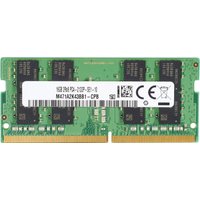
Mini PCs use SO-DIMM RAM — smaller than desktop RAM, but with identical performance characteristics. Most mini PCs come with 8GB as standard, which feels tight today. Upgrading to 16GB costs £30-50 and extends the machine’s useful life by years.
This guide covers DDR4 and DDR5 SO-DIMM upgrades, which models are worth buying, and how to choose between them.
Quick Picks: Best Mini PC RAM
| Type | Model | Speed | Capacity | Price | Best For |
|---|---|---|---|---|---|
| DDR4 | Crucial 16GB | DDR4-3200 | 16GB | ~£40 | Value DDR4 |
| Kingston Fury 16GB | DDR4-3200 | 16GB | ~£45 | Premium DDR4 | |
| DDR5-4800 | Crucial 16GB | DDR5-4800 | 16GB | ~£50 | Value DDR5 |
| Kingston Fury 16GB | DDR5-4800 | 16GB | ~£55 | Premium DDR5 | |
| DDR5-5600 | Corsair Vengeance 16GB | DDR5-5600 | 16GB | ~£70 | High-speed DDR5 |
| Kingston Fury Beast 16GB | DDR5-5600 | 16GB | ~£65 | High-speed DDR5 | |
| Capacity options (all brands) | |||||
| 8GB (basic upgrade) | DDR4/DDR5 | 8GB | ~£20-25 | Budget upgrades | |
| 32GB (future-proof) | DDR4/DDR5 | 32GB | ~£80-120 | Power users | |
DDR4 vs DDR5: Which Should You Buy?
DDR4: Older standard, still widely used. Cheaper. Adequate performance for office work, gaming, and general computing. Dying out as DDR5 costs drop.
DDR5: Newer standard, slightly better performance, higher speed options. Prices have dropped significantly — DDR5 is now only £10-15 more than equivalent DDR4.
Our recommendation: If your mini PC supports DDR5, buy DDR5. The price difference is small, and you’re future-proofing. If you’re stuck with DDR4 (older mini PC), DDR4-3200 is excellent value at £40.
DDR4 Picks (Best Value)
Crucial DDR4-3200 (£35-45 for 16GB)
Crucial makes reliable, affordable RAM. Their DDR4-3200 SO-DIMM is the value pick for DDR4 upgrades. Performance is identical to premium brands at a lower price point.
Why Crucial: Reliability is proven across millions of units. Warranty is solid. Compatibility with older mini PCs is excellent. No performance penalty versus premium brands.
Available capacities: 8GB, 16GB, 32GB. Buy 16GB (£40) for a meaningful upgrade from the 8GB standard.
View Crucial DDR4-3200 on Amazon UK
Kingston Fury DDR4-3200 (£40-50 for 16GB)
Kingston Fury is the premium DDR4 brand. Speeds are identical to Crucial, but build quality and aesthetics are noticeably better. Heatspreaders are larger, memory modules look more premium.
Why Kingston Fury: If you care about aesthetics and brand prestige, Kingston is worth the premium. Performance gain is zero, but the module looks nicer. Warranty and support are excellent.
Note: Fury is Kingston’s gaming-oriented line. Performance is identical to their non-Fury DDR4 (ValueRAM), but the name carries prestige.
View Kingston Fury DDR4-3200 on Amazon UK
DDR5 Picks (Current Standard)
Crucial DDR5-4800 (£45-55 for 16GB)
Crucial’s DDR5-4800 SO-DIMM is the value option for DDR5 upgrades. 4800 MHz is the JEDEC standard speed for DDR5, which means excellent compatibility and stability.
Why DDR5-4800: Lowest cost entry to DDR5. Compatibility with any DDR5-capable mini PC is guaranteed. Speed is perfectly adequate for office work, gaming, and multitasking.
Performance reality: Real-world performance difference between DDR5-4800 and DDR5-5600 is minimal — typically 2-5% in gaming and productivity. Not worth paying extra unless you’re pushing overclocking limits.
View Crucial DDR5-4800 on Amazon UK
Kingston Fury DDR5-4800 (£50-60 for 16GB)
Kingston Fury DDR5 maintains their premium positioning. Performance identical to Crucial, but with better aesthetics and brand prestige. If you’re already committed to Kingston gear, sticking with them is reasonable.
View Kingston Fury DDR5-4800 on Amazon UK
Corsair Vengeance DDR5-5600 (£60-75 for 16GB)
Corsair Vengeance steps up to DDR5-5600, which is the highest speed with guaranteed stability. Performance gain over 4800 MHz is minimal in real-world use, but it’s the fastest certified speed.
Why Corsair Vengeance: Premium brand, excellent build quality, high speeds. If your mini PC supports DDR5-5600 and you want the fastest available, Corsair Vengeance is the choice. £15-20 more than 4800 MHz options is reasonable for maximum speed.
View Corsair Vengeance DDR5-5600 on Amazon UK
Kingston Fury Beast DDR5-5600 (£55-70 for 16GB)
Kingston’s alternative to Corsair Vengeance. Same speeds, similar pricing, identical performance. Choose based on brand preference — both are excellent.
View Kingston Fury Beast DDR5-5600 on Amazon UK
Capacity Decisions: 8GB vs 16GB vs 32GB
8GB: Minimum for modern computing. Office work and light browsing work fine. Multitasking feels tight. Not recommended for purchase today unless you’re absolutely budget-limited.
16GB: Sweet spot for 2026. Handles multitasking, gaming, light virtualisation, and media work without strain. Will remain adequate for 5+ years. Recommended for most users.
32GB: Overkill for most users. Useful only if you run virtual machines, heavy creative software (video editing, 3D rendering), or plan to keep the machine for 7+ years without upgrades. Cost-benefit doesn’t justify the premium for typical use.
Our recommendation: Buy 16GB. It’s the best value for upgrade longevity. 32GB is insurance against future requirements that most users will never face.
Compatibility Check: Which Mini PCs Support What
| Mini PC | RAM Type | Max Capacity | Notes |
|---|---|---|---|
| Beelink EQ13 | DDR4 SO-DIMM | 32GB | Single slot, upgrade chip voids warranty |
| Geekom Mini Air12 | DDR4 SO-DIMM | 32GB | Single slot, soldered RAM on some models |
| ASUS PN42 | DDR4 SO-DIMM | 32GB | Single slot, bare-bones (no RAM included) |
| Lenovo M70q | DDR4 SO-DIMM | 32GB | Dual slot, upgrading is supported |
| Beelink SER6 Pro | DDR4 SO-DIMM | 32GB | Dual slot (16GB stock + 1 empty) |
| Intel NUC 14 Pro | DDR5 SO-DIMM | 96GB | Dual slot, full upgrade support |
| Minisforum UM780 XTX | DDR4 SO-DIMM | 32GB | Dual slot, upgrade-friendly |
| Mac Mini M4 | Integrated | Built-in | No upgrade possible, 16GB base standard |
Single vs Dual Channel: Does It Matter?
Single channel: One RAM slot with one module installed. Performance penalty of 5-10% in gaming and productivity tasks.
Dual channel: Two RAM slots with matching modules. Optimal performance. Performance advantage is real but modest for office work.
Reality: If your mini PC has two slots and is pre-configured with one 8GB module, adding a second 8GB module (same brand, same speed) unlocks dual-channel performance and increases total capacity to 16GB. This is an ideal upgrade scenario.
If your mini PC has only one slot (many do), you’re stuck with single-channel unless you replace the existing module with a higher-capacity one.
Installation Guide (Very Easy)
Step 1: Power off the mini PC and unplug.
Step 2: Access the RAM slot (usually behind a small panel or directly visible on the chassis).
Step 3: If upgrading: Push the retention clips on either end of the existing module away — it will pop up at an angle. Pull straight out and set aside.
Step 4: Align the new module with the slot (keyed notch prevents wrong orientation) and push firmly down until retention clips snap shut. It should sit flush with the chassis.
Step 5: Replace any panels, power on, and verify recognition in Windows or Linux.
Total time: 2 minutes. No tools required. Harder part is deciding which module to buy.
Brand Reliability: Crucial vs Kingston vs Corsair
Crucial: Owned by Micron, massive manufacturing scale. Extremely reliable. Excellent value. Warranty is 5 years (lifetime on some models). No frills, no RGB, just solid RAM.
Kingston: Second-largest RAM manufacturer globally. Excellent reliability. Slightly premium pricing. Good warranty support. Fury line is gaming-oriented but uses identical hardware to ValueRAM.
Corsair: Premium brand, excellent reliability. Slightly higher prices than Kingston. RGB options available (though invisible in a mini PC). Superior warranty and support. Overkill for mini PC use but no downsides.
Bottom line: All three are excellent and essentially bulletproof. Choose by price/capacity, not brand. A £40 Crucial module is as reliable as a £70 Corsair module.
Real-World Impact: 8GB vs 16GB Mini PC
8GB mini PC with heavy multitasking: System feels sluggish when running 20+ browser tabs, email, Discord, and a game simultaneously. Feels responsive for typical office work (5-10 tabs, email, documents).
16GB mini PC same scenario: Everything remains responsive. 20+ tabs, email, Discord, game, and a video call all running simultaneously — no lag. Feels smooth and capable.
The upgrade cost is £40-50. You’re buying 5+ years of longevity and eliminating the ceiling of system responsiveness. This is one of the best value upgrades you can make to a mini PC.
Recommendations by Scenario
I want maximum value, going with DDR4: Crucial DDR4-3200 16GB (~£40). You can’t go wrong. Proven reliability, low price, good warranty.
I want the best DDR4 with premium build quality: Kingston Fury DDR4-3200 16GB (~£45). Same performance, noticeably better aesthetics and build feel. Worth the premium if you see the modules regularly.
I’m buying DDR5 and want best value: Crucial DDR5-4800 16GB (~£50). Entry speed to DDR5 at lowest cost. Performance is identical to faster speeds in real-world use.
I want maximum speed and premium brand for DDR5: Corsair Vengeance DDR5-5600 16GB (~£70) or Kingston Fury Beast DDR5-5600 (~£65). High-speed, premium build, excellent warranty. Worth the extra £20 if you’re committed to maximum specs.
I’m future-proofing and never want to upgrade again: 32GB capacity in your preferred brand and speed. Cost is £80-120, and you’ll have headroom for a decade.
Frequently Asked Questions
Recommended Products
These are the products we recommend based on this guide. All links go to Amazon UK where you can check current prices and availability.
| Product | Why We Recommend It | Amazon UK |
|---|---|---|
| Corsair Vengeance DDR4 SO-DIMM 32GB (2×16GB) 3200MHz | Best overall DDR4 upgrade kit | View on Amazon UK |
| Kingston Fury Impact DDR4 SO-DIMM 32GB (2×16GB) 3200MHz | Reliable alternative with tight latency | View on Amazon UK |
| Corsair Vengeance DDR5 SO-DIMM 32GB (2×16GB) 5600MHz | Top-rated DDR5 kit for gaming & productivity | View on Amazon UK |
| Kingston Fury Impact DDR5 SO-DIMM 32GB (2×16GB) 5600MHz | Excellent DDR5 alternative with XMP support | View on Amazon UK |
| Laptop Screen Replacement (IPS Full HD) | Upgrade from TN to IPS panel | View on Amazon UK |
| iFixit Laptop Toolkit | Essential toolkit for screen replacement | View on Amazon UK |
| Samsung 990 Pro 2TB NVMe M.2 2280 | Fastest consumer NVMe — ideal for gaming & editing | View on Amazon UK |
| WD Black SN850X 2TB NVMe | Excellent Gen4 speed with heatsink option | View on Amazon UK |
Prices and availability may vary. As an Amazon Associate, we earn from qualifying purchases.