The HP EliteBook series is built for enterprise users who need serious performance without the premium soldering problem that plagues most modern laptops. Unlike consumer ranges, EliteBook models retain a remarkable commitment to user-serviceable components—meaning you can upgrade RAM and storage on most models without voiding warranty or requiring a technician visit.
This guide covers every EliteBook generation from 2022 onwards, showing you exactly which models are upgradeable and which parts will work. Whether you’re adding RAM to a G9 840 or replacing the SSD on a 2024 650, we’ve got the full compatibility breakdown.
Quick Reference: HP EliteBook Upgrade Compatibility

| Model | Generation | RAM Upgrade | Max RAM | SSD Upgrade | Upgradeability Score |
|---|---|---|---|---|---|
| EliteBook 840 | G9 (2022) | DDR5 SO-DIMM, 2× Slot | 64GB | M.2 2280 Gen4 | 5/5 |
| EliteBook 840 | G10 (2023) | DDR5 SO-DIMM, 2× Slot | 64GB | M.2 2280 Gen4 | 5/5 |
| EliteBook 840 | G11 (2024) | DDR5 SO-DIMM, 2× Slot | 64GB | M.2 2280 Gen4 | 5/5 |
| EliteBook 860 | G10 (2023) | DDR5 SO-DIMM, 2× Slot | 64GB | M.2 2280 Gen4 | 5/5 |
| EliteBook 860 | G11 (2024) | DDR5 SO-DIMM, 2× Slot | 64GB | M.2 2280 Gen4 | 5/5 |
| EliteBook 640 | G10-G11 | DDR5 SO-DIMM, 2× Slot | 32GB | M.2 2280 | 5/5 |
| EliteBook 650 | G10-G11 | DDR5 SO-DIMM, 2× Slot | 32GB | M.2 2280 | 5/5 |
| EliteBook Dragonfly | G3-G4 | LPDDR5 Soldered | N/A | M.2 2280 (some) | 1/5 |
| EliteBook x360 | 3in1 (varies) | Mostly SO-DIMM | 32GB | M.2 2280 (varies) | 4/5 |
EliteBook 800 Series: The Upgrade Champions
The EliteBook 840, 850, 860, and 830 models represent HP’s flagship business range. They’re built for professionals who can’t afford downtime, and HP’s design reflects that: two accessible SO-DIMM slots and a standard M.2 2280 SSD bay.
EliteBook 840 (G9, G10, G11)
The most popular EliteBook model. The 840 is a 14-inch ultrabook that balances performance, battery life, and durability. All recent generations support full RAM and SSD upgrades.
G9 (2022) Specs: 12th-gen Intel Core / Ryzen 6000 series, DDR5-4800, up to 64GB RAM, Intel 12th-gen iGPU or RTX A500M, TB4, 65W USB-C.
G10 (2023) Specs: 13th-gen Intel Core / Ryzen 7035U, DDR5-5600, up to 64GB RAM, TB4, 65W USB-C.
G11 (2024) Specs: Intel Core Ultra / AMD Ryzen AI, DDR5-5600, up to 64GB RAM, Meteor Lake/Zen 5 performance, TB4, 65W USB-C.
What You Can Upgrade: Both RAM slots accept DDR5 SO-DIMM modules up to 32GB each (for 64GB total). The SSD bay is a standard M.2 2280 slot that accepts Gen 4 or Gen 5 NVMe drives. No soldering, no thermal paste, no risks—just pop off the bottom panel and swap.
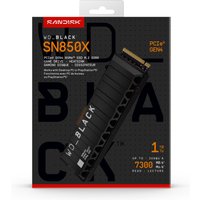
Recommended Parts: DDR5-5600 SO-DIMM 32GB (pair) — aim for Samsung, Kingston, or Corsair for reliability. 1TB-2TB M.2 2280 NVMe Gen4 — WD Black, Samsung 990 EVO, or Kingston A3000 are solid choices.
EliteBook 860 (G10, G11)
The 16-inch version of the 840. Same upgrade path, same SO-DIMM slots, same M.2 bay—just a larger screen for professionals who need more screen real estate.
Key Difference: The 860 can technically support higher RAM capacities in some configurations (up to 96GB has been reported on some BIOSes), but officially HP rates it at 64GB. Stick with 64GB for guaranteed compatibility and warranty coverage.
EliteBook 830 & 850
The 13-inch (830) and 15-inch (850) variants follow the same upgrade pattern as the 840 and 860. Both are fully user-serviceable and support DDR5 SO-DIMM upgrades and M.2 NVMe swaps.
EliteBook 600 Series: Budget Enterprise Upgrades
The EliteBook 640 and 650 are HP’s more affordable business laptops. They’re missing some premium features (USB-C might be slower, less robust hinges), but they retain the same upgrade-friendly design as the 800 series.
EliteBook 640 & 650 (G10, G11)
Specs: Intel Core i5/i7 or AMD Ryzen 5/7, DDR5 SO-DIMM, up to 32GB RAM (two 16GB modules), M.2 2280 SSD, 45W USB-C.
What You Can Upgrade: Both RAM slots are accessible. Max is 32GB total (16GB + 16GB). The SSD is a standard M.2 2280 NVMe slot.
Recommended Parts: DDR5 SO-DIMM 16GB modules for each slot. Same SSD options as the 840/860 series.
Note: Some G10 models ship with DDR4 instead of DDR5. Check your BIOS or current RAM before ordering—DDR4 and DDR5 slots are physically different and not interchangeable.
EliteBook Dragonfly: Premium Soldering Problem
The Dragonfly series (G3, G4, and newer) is HP’s ultra-premium ultrabook. It’s beautifully designed, incredibly thin, and ridiculously soldered.
RAM: LPDDR5 or LPDDR5X, soldered directly to the motherboard. Not upgradeable. Buy the right amount from the start.
Storage: Most models retain an M.2 slot, so you can replace the factory SSD. But checking your exact model on HP Dragonfly specs page is essential—some base models might have eMMC instead.
Upgradeability Score: 1/5. Unless you need the Dragonfly’s aesthetic or premium build for client meetings, you’ll get far better value from an EliteBook 800 series. The 840 G11 is thinner than many consumer ultrabooks and fully upgradeable.
EliteBook x360: 2-in-1 Flexibility
The EliteBook x360 variants (13c, 14c, 15c) are convertible business laptops. Most support SO-DIMM RAM upgrades and M.2 SSD swaps, though you’ll want to verify your specific generation.
RAM: Usually 2× SO-DIMM slots, up to 32GB total. Check your BIOS or physical inspection—some models do use soldered RAM.
Storage: M.2 2280 slot on most models.
Upgradeability Score: 4/5. Excellent upgrade potential if your model has SO-DIMM slots. The 2-in-1 hinge is more complex to open than the 840/860, so take your time and use a guide.
Recommended Upgrade Parts for HP EliteBook
RAM — DDR5 SO-DIMM
For EliteBook 840/860/830/850 (G9 onwards): DDR5-5600 32GB SO-DIMM modules. Buy as a pair if upgrading both slots. Brands to trust: Samsung, Kingston Fury Beast, Corsair Vengeance, Crucial. Budget: £150–200 per 32GB module.
For EliteBook 640/650: DDR5 SO-DIMM 16GB modules. Max 2× 16GB for 32GB total. Budget: £70–100 per module.
Storage — M.2 2280 NVMe SSD
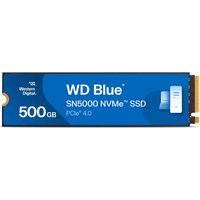
1TB or 2TB M.2 2280 Gen4 NVMe. Recommended drives: WD Black SN850X, Samsung 990 EVO, Kingston A3000. All EliteBook models from 2022 onwards support Gen4; newer models accept Gen5 but Gen4 is fine and cheaper. Budget: £80–150 for 1TB, £150–250 for 2TB.
Chargers & USB-C Power
EliteBook 840/860 (G9 onwards): Support 65W USB-C charging. Third-party 65W USB-C PD chargers work fine; official HP chargers cost 2-3× more but add warranty peace of mind. Make sure any third-party charger is certified 65W PD and supports your region’s plug type.
Docks & Peripherals
Thunderbolt 4: EliteBook 800/x360 models include TB4 ports. HP laptop upgrade guides cover dock compatibility in detail. HP’s official docks are premium but solid; alternatives from Lenovo, Dell, and Kensington also work via TB4.
HP EliteBook vs Lenovo ThinkPad for Upgradeability
Both HP EliteBook and Lenovo ThinkPad series maintain SO-DIMM slots on most models, a rarity in modern business laptops. Here’s how they compare:
| Factor | HP EliteBook | Lenovo ThinkPad |
|---|---|---|
| RAM Upgrades | SO-DIMM on 800/600 series. Dragonfly soldered. | SO-DIMM on most X/E/T series. Some P series soldered. |
| SSD Upgrades | M.2 2280 on nearly all models | M.2 2242/2280 on most; some use proprietary slots |
| Ease of Opening | Single bottom panel, documented in QRG | Slightly more screws; good documentation |
| Warranty Impact | User upgrades generally covered; check your contract | Depends on SLA; consumer models more permissive |
| Performance Tier | Mainstream business (5/5 upgradeability) | Professional (4/5 upgradeability; premium P series less friendly) |
Verdict: If upgradeability is your priority, HP EliteBook 840/860 are unbeatable. They’re more standardised than ThinkPad (easier to find exact parts) and equally well-documented. ThinkPads are slightly more rugged (military-spec hinges, better spill protection), but EliteBook edges out on sheer upgrade simplicity.
HP EliteBook Upgrade FAQs
Can I mix RAM speeds on my EliteBook?
Not recommended. If your EliteBook shipped with DDR5-5600, both SO-DIMM slots should be DDR5-5600. Using DDR5-4800 or DDR5-6400 in one slot and 5600 in the other will cause the system to downclock to the slower speed, wasting performance. Always buy matching pairs when upgrading both slots.
Will upgrading my EliteBook void the warranty?
No, on official HP policy. User-upgradeable components (RAM, SSD) are explicitly listed in the Service Maintenance Guide (SMG) that ships with every EliteBook. HP’s warranty does NOT cover accidental damage from opening, but planned RAM/SSD upgrades are fair game. Your Business Support contract might differ—check your agreement.
What’s the maximum RAM I can install on an EliteBook 840?
Official maximum is 64GB (2× 32GB DDR5 SO-DIMM modules). Some users report 96GB working in BIOS (via 2× 48GB modules), but this voids warranty and isn’t recommended. Stick with 64GB for guaranteed compatibility.
Can I use Gen5 NVMe SSD on my EliteBook?
Yes, but there’s no speed benefit. EliteBook 840/860 (G9-G11) support PCIe Gen4; Gen5 drives are backward-compatible and will run at Gen4 speeds. You’re paying premium Gen5 prices for Gen4 performance. Save money and buy Gen4 instead.
How do I know if my EliteBook uses DDR4 or DDR5?
Check your current RAM: open System Information (Windows) or About (Mac), look for “Memory” and note the speed. DDR5 will show “DDR5-XXXX”; DDR4 will show “DDR4-XXXX”. Or physically open the bottom panel and inspect: DDR5 SO-DIMM has a notch in a different position than DDR4. Never buy RAM without confirming your generation first.
Is Dragonfly upgrade-friendly like the 840?
No. Dragonfly RAM is soldered LPDDR5/LPDDR5X and not upgradeable. Buy your target RAM amount from factory. Storage (SSD) is usually upgradeable, but always verify your exact model’s specs first.
Recommended Products
These are the products we recommend based on this guide. All links go to Amazon UK where you can check current prices and availability.
| Product | Why We Recommend It | Amazon UK |
|---|---|---|
| Corsair Vengeance DDR4 SO-DIMM 32GB (2×16GB) 3200MHz | Best overall DDR4 upgrade kit | View on Amazon UK |
| Kingston Fury Impact DDR4 SO-DIMM 32GB (2×16GB) 3200MHz | Reliable alternative with tight latency | View on Amazon UK |
| Corsair Vengeance DDR5 SO-DIMM 32GB (2×16GB) 5600MHz | Top-rated DDR5 kit for gaming & productivity | View on Amazon UK |
| Kingston Fury Impact DDR5 SO-DIMM 32GB (2×16GB) 5600MHz | Excellent DDR5 alternative with XMP support | View on Amazon UK |
| Samsung 990 Pro 2TB NVMe M.2 2280 | Fastest consumer NVMe — ideal for gaming & editing | View on Amazon UK |
| WD Black SN850X 2TB NVMe | Excellent Gen4 speed with heatsink option | View on Amazon UK |
| Crucial P5 Plus 1TB NVMe | Great value Gen4 SSD | View on Amazon UK |
| Kingston NV2 1TB NVMe | Budget-friendly with solid reliability | View on Amazon UK |
Prices and availability may vary. As an Amazon Associate, we earn from qualifying purchases.
Related HP Upgrade Guides
- HP Battery Replacement: EliteBook, Pavilion & OMEN Step-by-Step
- Best RAM for HP Laptops in 2026
- HP ProLiant DL365 Gen11 RAM & SSD Upgrade Guide (2023)
- HP ProLiant ML30 Gen11 RAM & SSD Upgrade Guide (2023)
- HP ProLiant DL385 Gen10 Plus RAM & SSD Upgrade Guide (2020)
- HP Upgrade Guide
Not sure what fits? Use our free Compatibility Checker covering 3,195+ models.
Helpful Guides
Related Resources
- Laptop Upgrade Compatibility Checker — Check RAM, SSD & charger compatibility for 3,195+ models
- RAM Compatibility Guide — DDR4, DDR5 & LPDDR5 explained
- SSD Compatibility Guide — NVMe, SATA & M.2 sizes
- Charger Compatibility Guide — USB-C, Power Delivery & GaN
- Docking Station Compatibility Guide — Thunderbolt, USB-C & DisplayLink