Affiliate disclosure: this page contains affiliate links — if you buy through them we may earn a commission at no extra cost to you. As an Amazon Associate we earn from qualifying purchases.
Almost every question about upgrading a laptop CPU has the same answer, and it isn’t the one people want: on virtually every laptop built since around 2015, the processor is soldered to the mainboard and cannot be changed. Not by you, not by a repair shop with ordinary tools, and usually not by the manufacturer either — they replace the whole board.
But “virtually every” isn’t “every”. A small number of laptops genuinely do take a removable CPU, and if you own one of them the upgrade path is real. This guide shows you how to find out which camp your machine is in within about a minute, lists the machines that actually are socketed, and — because for most readers the answer will be no — sets out what to upgrade instead and what it will realistically buy you.
The short answer, by laptop age
| Laptop bought 2016 or later | No. The CPU is soldered (BGA). Go straight to what to upgrade instead. |
| Laptop from roughly 2011–2015 | Possibly. Intel Socket G1/G2/G3 and AMD Socket FS1 machines from this era are often socketed. Check yours. |
| Thick desktop-replacement or barebones chassis | Likely yes. Clevo-built machines using a desktop LGA socket are still sold today. See the exceptions list. |
| Any Apple silicon Mac (M1 onwards) | No, and never. CPU, GPU and memory share one package. Nothing is changeable after purchase. |
| Framework Laptop 13 or 16 | Effectively yes — not by swapping the chip, but by swapping the whole mainboard. See the Framework route. |
Why almost every laptop CPU is soldered
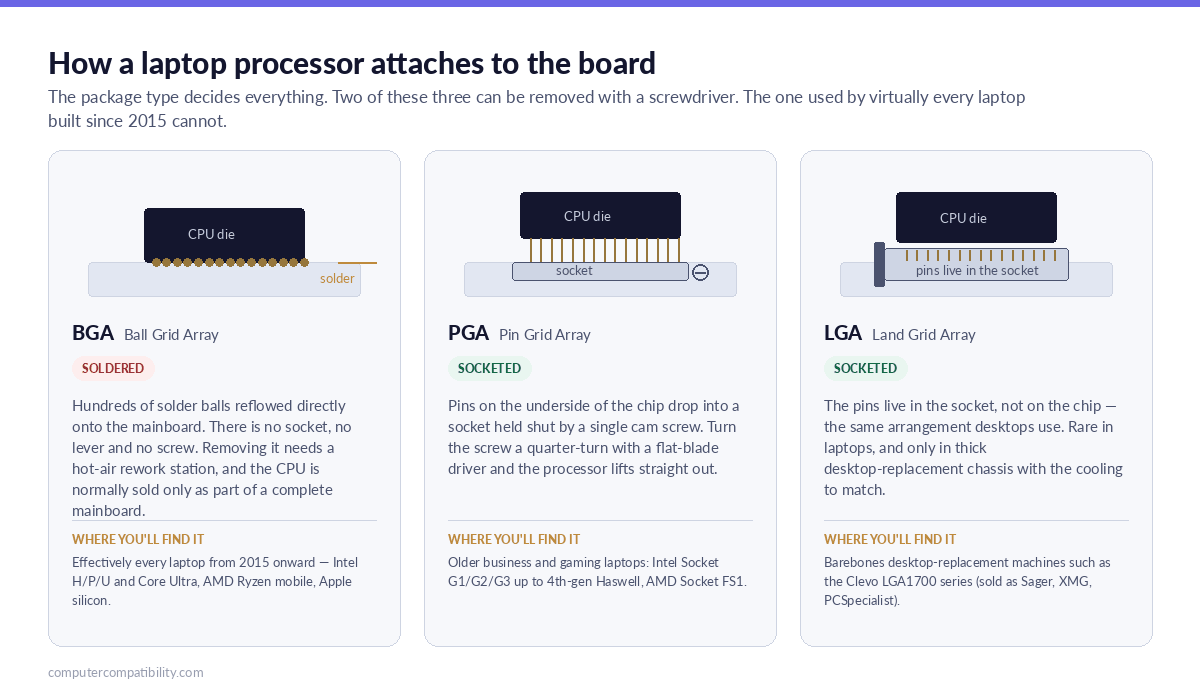
It comes down to how the chip is packaged. A socketed processor needs pins, a socket body, a retention mechanism and clearance above the board for all three. That adds several millimetres of height, a meaningful amount of board area, and electrical path length that hurts at high memory speeds.
A ball grid array (BGA) package deletes all of it. The chip is reflowed straight onto the mainboard on a grid of solder balls, sitting flush with the board and letting the cooler press directly onto the die. Manufacturers get a thinner machine, better thermals per millimetre and shorter traces. Buyers lose the ability to change the part.
Intel’s transition point is well documented: Socket G3 (rPGA946B/FCPGA946), used for 4th-generation Haswell mobile chips, was the last pin grid array socket Intel produced for mobile processors — every mobile microarchitecture after Haswell is BGA only. AMD reached the same point at almost the same time: Socket FS1 was the last PGA socket for AMD mobile processors, and everything after Piledriver moved to µBGA packaging.
The trend has since gone further. AMD’s current mobile packages — FP6 and its successors, covering Ryzen 4000, 5000 and 7000 mobile — are BGA. And Intel’s Core Ultra 200V (Lunar Lake) parts place the system memory on the processor package itself, which means those machines can’t have their RAM changed either. If you’re shopping rather than upgrading, that matters more than the CPU question: it makes the specification you choose at checkout permanent.
How to check whether your laptop’s CPU is socketed
Four methods, listed most reliable first. If the first one gives you a clear answer, stop there — the others are for when documentation is thin.
1. Read the service manual’s parts list (definitive)
This is the only method that is genuinely conclusive, and it takes about two minutes. Every major manufacturer publishes a service or maintenance manual containing a field-replaceable parts list. The test is simple:
If the parts list contains a separate line item for the processor, it is socketed. If the processor only ever appears bundled into a system board part number, it is soldered. Manufacturers don’t sell a part they can’t fit.
| Brand | Where to look | What you want |
|---|---|---|
| Lenovo / ThinkPad | PSREF for the specification, then the Hardware Maintenance Manual from Lenovo Support | The FRU list — a standalone “Processor” FRU means socketed |
| Dell | Dell Support → enter Service Tag → Manuals → Service Manual | A “Removing the processor” procedure, separate from board removal |
| HP | HP Support → Maintenance and Service Guide; QuickSpecs for the specification | Spare part numbers list — a separate processor SKU |
| ASUS / Acer / MSI | Brand support site disassembly manual, or a teardown on iFixit | Any step that lifts the CPU out independently of the board |
2. Read the package field in CPU-Z or HWiNFO (fast)
Install CPU-Z or HWiNFO, open the CPU tab and look at the Package line. The naming tells you almost everything:
| What the Package field says | What it means |
|---|---|
| Anything beginning BGA or FCBGA — e.g. BGA1744, FCBGA1964, FP6, FP7, FP8 | Soldered. No upgrade path. |
| Anything beginning rPGA or FCPGA — e.g. rPGA988B, FCPGA946, FS1 | Socketed. Removable in principle. |
| Socket 1700 LGA or another desktop LGA socket | Socketed — a desktop CPU in a laptop chassis. |
One caveat: reporting on OEM boards is occasionally wrong or blank, which is exactly why the service manual outranks this method. Treat a BGA reading as reliable and a socketed reading as worth confirming.
3. Look the processor up on the manufacturer’s database
Find your exact CPU model in Windows (Settings → System → About, or Task Manager → Performance → CPU), then look it up on Intel ARK or AMD’s product pages and read the Package or Socket field.
There’s also a naming tell worth knowing. Intel mobile parts with an H, P, U or V suffix, and everything in the Core Ultra series, are BGA. The parts you’re hoping to see are the older M-suffix mobile chips — every Socket G3 SKU carried an M — or a plain desktop model number, which would mean you own one of the rare LGA machines.
4. Look at the board (last resort)
If you’re already inside the machine — replacing thermal paste, for instance — the difference is unmistakable. A socketed CPU sits in a plastic socket body with a flat-blade cam screw beside it, usually marked with an open/closed arrow; a quarter-turn releases the chip. A BGA processor is a bare rectangular die sitting directly on the board with no surrounding hardware at all. If you can see the die and there is nothing to unscrew, the answer is no.
Laptops that genuinely do have a socketed CPU
Every entry below is a category rather than an exhaustive model list, because the honest position is that the boundary runs through generations rather than product names. Confirm your specific machine against its own service manual before buying anything.
| Category | Era | Socket | Notes |
|---|---|---|---|
| Intel mobile, Sandy Bridge & Ivy Bridge (2nd–3rd gen) | 2011–2012 | Socket G2 (rPGA988B) | Widespread across business laptops and gaming chassis of the period |
| Intel mobile, Haswell (4th gen) | 2013–2014 | Socket G3 (rPGA946B / FCPGA946) | Intel’s final mobile PGA socket. All M-suffix SKUs. |
| AMD mobile, Llano / Trinity / Richland | 2011–2013 | Socket FS1 / FS1r2 | AMD’s final mobile PGA socket |
| Mobile workstations of the same era | 2011–2014 | G2 / G3 | Older ThinkPad W-series, Dell Precision and HP EliteBook/ZBook mobile workstations are the most likely candidates — they were built to be serviced |
| Clevo desktop-CPU barebones | 2022 onwards | LGA1700 | The NH55JNNQ / NH5xJNxx takes a standard desktop LGA1700 processor. Rebadged as Sager, XMG, Eluktronics and PCSpecialist. |
The Framework exception — a different answer to the same problem
Framework doesn’t socket the CPU. It does something more useful: it sells the entire mainboard as a user-replaceable part, with the processor already on it. Swapping one is a fully documented procedure — Framework’s own mainboard guide rates it “moderate” and puts it at 30–45 minutes — and the same chassis has been offered with successive Intel and AMD generations, so the upgrade path is genuinely forward-looking rather than a one-off.
It costs more than a used mobile CPU and less than a new laptop, and it’s the only mainstream route in 2026 that lets you keep a chassis, screen, keyboard and battery while changing the processor. If CPU upgradeability is the thing you actually care about, this is the shape it takes now. Our Framework upgrade guide covers what each mainboard generation fits.
Even if it is socketed, should you actually do it?
Often not — and this is where the enthusiast forums tend to go quiet about the failure modes. Four things stand between a socketed CPU and a working upgrade:
BIOS support. A laptop BIOS only carries microcode for the processors that machine was validated with. Drop in a chip the BIOS doesn’t recognise and you may get no display at all. Vendor BIOS release notes sometimes list added CPU support; if yours doesn’t mention your target chip, assume it won’t post.
Thermal design. The heatsink, heatpipe and fan were specified for the TDP of the original part. Fitting a 45W quad-core into a chassis designed around a 35W dual-core usually produces a machine that thermally throttles back to roughly its original performance, but louder and hotter. You pay for the CPU and get very little.
Power delivery. The board’s VRM has a design limit, and unlike a desktop there is no headroom built in. Exceeding it causes instability under load rather than a clean refusal to boot, which is the worst kind of fault to diagnose.
Economics. A used Haswell-era quad-core is cheap, but so is the performance it delivers by 2026 standards. Against a £40–£60 SSD upgrade on the same machine, a CPU swap is almost always the worse purchase — see the ranking below.
The honest summary: on a genuinely socketed machine, a CPU upgrade is a satisfying project and a poor investment. Do it because you want to, not because you expect the laptop to feel new.
What to upgrade instead, ranked by what you’ll actually notice
For the large majority of readers the CPU answer is no, so this is the section that matters. Ranked by perceived improvement per pound spent on a machine that currently feels slow:
| Upgrade | Typical UK cost | Time | What changes |
|---|---|---|---|
| 1. SATA hard drive or early SSD → modern NVMe SSD | £35–£90 | 20–30 min | The single biggest change on any older machine. Boot, application launch and file operations all transform. See our SSD compatibility guide. |
| 2. RAM increase (if not soldered) | £25–£70 | 10–15 min | Fixes the stuttering that comes from running out of memory with a browser and Teams open. Check first against the soldered RAM list and our RAM compatibility guide. |
| 3. Battery replacement | £30–£70 | 20–40 min | Restores portability, and on some machines removes the aggressive power throttling that kicks in on a degraded pack. Check yours with our battery health guide. |
| 4. Thermal paste and pad replacement | £8–£15 | 45–90 min | On a machine three or more years old, this frequently recovers real sustained performance that was being lost to throttling. Our repaste guide covers the procedure. |
| 5. Wi-Fi card | £15–£30 | 15 min | Cheap fix for an older 802.11ac card on a Wi-Fi 6 network. See the Wi-Fi card upgrade guide. |
A useful way to think about it: the CPU is rarely what makes an old laptop feel old. Storage latency, memory pressure and thermal throttling are, and all three are fixable for less than the price of the processor you can’t fit anyway. If you’re weighing that against replacement, our compatibility checker will tell you what your exact model supports.
Brand-by-brand quick answers
| Brand | CPU upgrade? | What to do instead |
|---|---|---|
| Lenovo / ThinkPad | Only on pre-2015 models. Everything from the T460/L460 era onward is BGA. | Lenovo upgrade guide — most ThinkPads keep excellent RAM and SSD access |
| Dell | Older Precision and Latitude only. | Dell upgrade guide |
| HP | Older EliteBook and ZBook mobile workstations only. | HP upgrade guide |
| ASUS | No on current ROG, TUF, Zenbook and Vivobook. All BGA. | ASUS upgrade guide |
| Acer | No across Aspire, Swift, Nitro and Predator. | Acer upgrade guide |
| MSI | No on current models. Some older GT-series desktop-replacement machines were socketed. | MSI upgrade guide |
| Apple | No — and on Apple silicon the memory is on the same package, so that’s fixed at purchase too. | MacBook upgrade guide |
| Framework | Yes, by mainboard replacement rather than chip swap. | Framework upgrade guide |
Frequently Asked Questions
Can I upgrade the CPU on a ThinkPad L15 Gen 1 (AMD)?
No. Lenovo’s PSREF lists the AMD L15 Gen 1 with Ryzen 4000-series U processors — the Ryzen 3 4300U, Ryzen 3 PRO 4450U, Ryzen 5 4500U, Ryzen 5 PRO 4650U and Ryzen 7 PRO 4750U. All of those use AMD’s FP6 package, which is BGA — soldered to the board with no socket. The good news is that this machine is otherwise unusually upgradeable: PSREF specifies two DDR4 SO-DIMM slots, dual-channel capable, taking up to 64GB of DDR4-3200. If it feels slow, memory and an NVMe SSD are where the improvement is.
Can I put a desktop CPU in a laptop?
Only if the laptop was designed for one. Clevo’s LGA1700 barebones machines take a standard desktop processor because the board, socket, VRM and cooling were all built around that. You cannot fit a desktop CPU to a laptop that wasn’t — there is no socket, no clearance and no cooling capacity for it.
Can I upgrade a laptop GPU?
Almost never. Discrete laptop GPUs are soldered for the same reasons as the CPU. The MXM module standard allowed swaps in some older workstations and gaming machines, but it was never widely adopted, modules are scarce and expensive, and vendor BIOS support is inconsistent. The practical alternative on a Thunderbolt machine is an external GPU enclosure.
Will a faster CPU fix my slow laptop?
Usually not, and this is worth internalising before spending anything. If the machine is slow to boot and slow to open applications, that’s storage. If it stutters when you switch between things, that’s memory. If it starts fast and gets slow after ten minutes, that’s thermal throttling. Only sustained, all-cores-busy work — video encoding, compiling, heavy simulation — is genuinely CPU-limited.
If my soldered CPU fails, is the laptop repairable?
In principle yes, in practice rarely economically. Reballing or replacing a BGA chip requires a hot-air rework station, a stencil and considerable skill. Manufacturers don’t do it — they replace the mainboard, and on an out-of-warranty machine that cost usually exceeds the laptop’s value.
Does upgrading the CPU void my warranty?
On a machine still under manufacturer warranty, assume yes unless the service manual explicitly designates the processor a customer-replaceable part. Consumer law in the UK and EU protects you against a blanket refusal, but a fault you caused during the swap won’t be covered. On a socketed machine that’s old enough to be worth upgrading, warranty is usually a non-issue anyway.
How do I know whether my BIOS supports a different CPU?
Check the BIOS release notes on the manufacturer’s support page — added processor support is normally listed explicitly. If the chip you want isn’t mentioned in any release, treat it as unsupported. Laptop BIOSes carry microcode only for validated parts, and an unrecognised processor typically results in no display rather than a helpful error message.
Related guides
- Soldered RAM Laptops: Complete List of Non-Upgradeable Models
- Laptop Upgrade Compatibility Checker — 3,195+ models
- Laptop RAM Compatibility Guide — DDR4, DDR5 & LPDDR5
- Laptop SSD Compatibility Guide — NVMe, SATA and M.2 sizes
- Laptop Thermal Paste Replacement Guide
- Intel vs AMD Laptops in 2026
How we verify this guide
Socket and package claims in this guide are taken from processor and socket documentation rather than retailer listings, and the model-level guidance points you at the manufacturer’s own service manual, because that is the only source that settles the question for a specific machine. We are explicit about what cannot be upgraded, we don’t list a machine as socketed unless the socket is documented, and we re-verify on a regular cycle. More on our method →